
 0
0
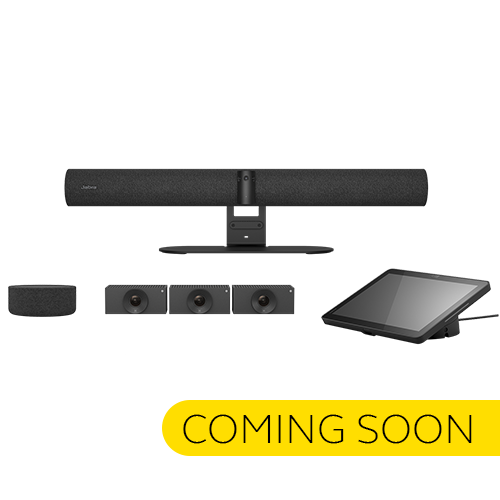
-500x500.jpg "Panacast Room Kit Multi")

-500x500.jpg "Panacast Room Kit Multi")
-500x500.jpg "Panacast Room Kit Multi")
-500x500.jpg "Panacast Room Kit Multi")
| Connectivity-PanaCast SpeakerMic | ||
| Connectivity | Cat6 (not included), RJ45, RJ45 to USB-C (SpeakerMic Adapter) | |
| Maximum cable length | Up to 30 meters | |
| Jabra Control IP - PanaCast 50 VBS Video Bar | ||
| Main unit dimensions (WxHxD) | 248 x 85 x 156 mm | 9.8 x 3.4 x 6.2 in | |
| Main unit weight | 958g | 33.8oz | |
| Display size | 10.1″ | |
| Display orientation | Landscape | |
| Display resolution | 1920 x 1200 | |
| PoE power injector | Yes | |
| Power over ethernet (PoE) | IEEE 802.3af | |
| Kensington lock compatible | Yes | |
| General info -PanaCast 50 VBS Video Bar | ||
| Box contents | PanaCast 55 VBS video bar • power supply • wall mount • Jabra Control IP • Privacy cover with sensor • Cable compartment cover and tool • 1 x HDMI cable 1.83m/6ft • 1 x regional power cable | |
| Packaging dimensions (WxHxD) | 1065 x 175 x 210 mm | 41.9 x 6.9 x 8.3 in | |
| Main unit dimensions (WxHxD) | 730 x 77 x 146 mm | 28.8 x 3.1 x 5.8 in | |
| Main unit weight (base unit) | 2259 g | 79.7 oz | |
| Package weight | 5760.5 g | 203.2 oz | |
| Warranty | 2 years | |
| Onboard AI | Yes | |
| Cable management | Yes | |
| Kensington lock compatible | Yes | |
| Operating voltage | 100-240V, 12V, 5A | |
| Power Adapter | AC 100-240V, Output DC 12V 5A | |
| LED features and functions | Answer/end call, Firmware update status, Mute/unmute, Power indicator | |
| Video - PanaCast 50 VBS Video Bar | ||
| Video output | 2 x HDMI | |
| Display resolution | Supports up to 4K, Touch Display Compatible | |
| Content sharing | Apple Airplay (only supported by Zoom), HDMI input, Microsoft Teams-Cast (only supported by Teams) | |
| Number of cameras | 3 | |
| Type of camera | Panoramic multi-camera array | |
| Camera resolution | Up to 3840 x 1080 px | |
| Zoom | Up to 6x lossless digital zoom | |
| Field of view | Horizontal: 180°, Vertical: 54° | |
| Intelligent Zoom | Yes | |
| Intelligent Meeting Space | Yes | |
| Multi-stream Dynamic Composition | Yes | |
| Dynamic Composition | Yes | |
| Virtual Director | Yes | |
| Vivid HDR | Yes | |
| Support secondary external USB camera | Yes | |
| Audio - PanaCast 50 VBS Video Bar | ||
| Supported number of SpeakerMics | 1 | |
| Audio coverage | Up to 7 m | |
| Audio coverage (PanaCast 55 VBS with PanaCast SpeakerMic) | Up to 11 m | |
| Speakers | 2 x 2" (50mm) woofers, 2 x 3/4" (20mm) tweeters | |
| Speaker frequency range | 80Hz - 20000Hz | |
| Number of speakers | 4 | |
| Automatic Speaker Detection | Yes | |
| Noise Reduction Echo Cancellation | Yes | |
| Non-Speech Noise Suppression | Yes | |
| Woofer driver | 2 inches, outer diameter 61mm; Sensitivity: 79dB ±2dB @ 1 Watt, 1 meter; Rated Power: 5 Watts; Impedance: 4 Ohms | |
| Mid-Range driver | 0.6 inches, outer diameter 33.2mm; Sensitivity: 80.5dB ±2dB @ 1 Watt, 1 meter; Rated Power: 5 Watts; Impedance: 4 Ohms | |
| Microphone type | 8 microphone beamforming array - certified for rooms up to 4.5m x 6m | |
| Number of microphones | 8 | |
| Microphone sensitivity | -37dBFS | |
| Microphone frequency range | 100Hz - 16000Hz | |
| Aux-Out | Yes | |
| Security - PanaCast 50 VBS Video Bar | ||
| Media encryption | Provided by VaaS Partner | |
| Access management | Jabra+; Admin menus; Jabra Web Console; Local account; VaaS Admin Portals including MS Teams Admin Centre and Zoom Device Management | |
| Access management | Remote log in via Jabra+, Jabra Web Console and VaaS Admin Portal | |
| Access to Admin settings, Jabra Web Console, Jabra+ | Yes | |
| Lockdown with secureboot, OS verified boot, Vendor lock | Yes | |
| Log retrieval via Jabra Web Console | Yes | |
| Microsoft and Zoom based VaaS account authentication | Yes | |
| Connectivity - PanaCast 50 VBS Video Bar | ||
| Interfaces | Ethernet (RJ45), HDMI, Wi-Fi (802.11a/b/g/n/ac), 1 x USB-A, 2 x USB-C | |
| Bluetooth® version | 5.1 | |
| Supported USB versions | USB 2.0, USB 3.0 |
|
| Network - PanaCast 50 VBS Video Bar | ||
| Internet Protocol (IP) | IPv4, IPv6 | |
| Ethernet | RJ45 | |
| Auto-MDIX | Yes | |
| Proxy support | HTTPS | |
| Support DHCP | Yes | |
| Support Static IP Address | Yes | |
| Software & Apps - PanaCast 50 VBS Video Bar | ||
| Compatible software and/or apps | Jabra+; Jabra Web Console for remote device management via HTTPS; Support for native 3rd party applications, including Microsoft Teams Room for Android and Zoom Rooms; Cloud service providers including Microsoft Teams Admin Center and Zoom Device Management | |
| Integrated People Count | Yes | |
| Ease of use -PanaCast 50 VBS Video Bar | ||
| Appliance mode | Yes | |
| BYOD mode | Yes | |
| Digital pan/tilt/zoom | Yes | |
| Manual Pan-Tilt-Zoom (PTZ) | Yes | |
| One touch meeting join | Yes | |
| Camera privacy cover | Yes | |
| Extended info -PanaCast 50 VBS Video Bar | ||
| Operating temperature | 5°C to 35°C | 41°F to 95°F | |
| Operating humidity | 15% to 80% | |
| Storage temperature | -20°C to 60°C | -4°F to 140°F | |
| Maximum altitude | 4876.8m | 16000ft | |
| Proximity sensor | Yes | |
| Temperature sensor | Yes | |
| Humidity sensor | Yes | |
| CO2 sensor | Yes | |
| TVOCs sensor | Yes | |
| General info-PanaCast SpeakerMic | ||
| Box contents | PanaCast SpeakerMic, Mounting plate, SpeakerMic Adapter, 3x table adhesive, Installation leaflet | |
| Packaging dimensions (WxHxD) | 67mm x 186mm x 140mm | 2.64in x 7.32in x 5.51in | |
| Main unit dimensions (ØxH) | 136mm x 55mm | 5.35in x 2.17in | |
| Materials used | Fabric, Aluminum, Black plastic | |
| Main unit weight | 623g | 22oz | |
| USB cable length | 0.5m | 1.6ft | |
| IP rating (main unit) | IPX2 | |
| Warranty | 2 years | |
| Audio-PanaCast SpeakerMic | ||
| Number of microphones | 4 | |
| Microphone type | Omnidirectional | |
| Microphone frequency range | Analog 100Hz - 18000Hz | Digital 100Hz - 18000Hz | |
| Microphone bandwidth | 100Hz - 18000Hz | |
| Noise reduction on calls | Yes | |
| Speaker size | 60mm | 2.36in | |
| Speaker frequency range | 100Hz - 18000Hz | |
| Speaker bandwidth (speak mode) | 100Hz - 18000Hz | |
| Speaker bandwidth (music mode) | 100Hz - 18000Hz | |
| Software & Apps-PanaCast SpeakerMic | ||
| Compatible software and/or apps | Jabra Plus, Cloud service provider including Microsoft Teams Admin Center and Zoom Device Management | |
| Extended info-PanaCast SpeakerMic | ||
| Operating temperature | 0°C to 40°C | 32°F to 104°F | |
| Storage temperature | -20°C to 45°C | -4°F to 113°F | |
| General info-Cam Crew | ||
| Box contents | Huddly Crew (3 cameras) • 4 x 3m ethernet cable • 3 x camera Wall Mount • USB Adapter • 1 x 0.6m USB-C-C cable • 1 x 0.6m USB-A-C cable • AC/DC Power Adapter & Regional Plugs • Wall Mount • Ethernet Switch & 4 x Regional Power Cables | |
| Main unit dimensions (WxHxD) | 90 mm x 53 mm x 122 mm | 3.5 in x 2.0 in x 4.8 in | |
| Main unit weight (base unit) | 0.6 kg | 1.3 lbs | |
| Warranty | 3 years | |
| Onboard AI | Yes | |
| Power Requirement | 5v 3A external power adapter | |
| LED functions | Power indicator | |
| Certifications and compliance | Microsoft Teams Rooms; Zoom Rooms | |
| Video-Cam Crew | ||
| Type of camera | Fixed-focus digital PTZ | |
| Camera resolution | 1920 x 1080 | |
| Zoom | Up to 5x digital zoom | |
| Field of view | Horizontal: 92°, Vertical: 65° | |
| Connectivity-Cam Crew | ||
| Interfaces | USB C via USB Adapter; SuperSpeed USB 3; Ethernet (RJ45) |
|
| Software & Apps-Cam Crew | ||
| Compatible software and/or apps | Compatible software and/or apps | |
| Integrated People Count | Yes | |
Some meeting rooms are just hard. Too wide, too long, awkward corners — and suddenly half the participants are off-screen or barely audible. The Jabra PanaCast Room Kit Multi was built specifically for these spaces.
It's an all-in-one conferencing system for larger meeting rooms — up to 22 people — that combines multi-camera video with extension audio in a single, cohesive package. Everything ships together. There's no third-party audio to source separately, no integrator to call, no programming to wade through. You plug it in, and it works.
That might sound simple. For large rooms, it genuinely isn't — which is what makes this kit worth paying attention to.
USB and cable-based installation. That's it. Large room conferencing systems have traditionally demanded hours of configuration, often a certified technician, and sometimes proprietary software just to get a camera talking to a display. The PanaCast Room Kit Multi sidesteps all of that. You could realistically have a room up and running in the time it usually takes to schedule the setup appointment.
No programming required isn't a marketing footnote here — it's the whole point.
A single wide-angle camera works well in a huddle space. In a room built for 20-plus people, it's a compromise at best. The Room Kit Multi uses multiple cameras to cover the full space — different angles, different zones — so remote participants aren't squinting at a wall of tiny heads or missing whoever just spoke from the back corner.
The extension audio follows the same logic. Rather than relying on a single microphone to carry a 30-foot room, the system distributes audio pickup across the space. Every voice gets captured clearly, not just the ones near the front.
The AI-powered tracking here does something that passive wide-angle cameras can't: it responds to who's actually speaking. Picture-in-Picture mode keeps the active speaker visible while simultaneously showing the full room — so remote attendees have both the context of the whole group and the focus they need to follow the discussion.
It's a small thing until you've sat through a meeting where you genuinely couldn't tell who was talking. Then it becomes obvious why it matters.
For IT administrators managing multiple meeting rooms across a building — or across multiple sites — the ability to monitor and manage devices remotely through Jabra Plus is quietly significant. Updates, diagnostics, configuration checks: all handled centrally, without physically visiting each room. At scale, that kind of oversight saves real time.
Not every large room has a straightforward layout. Some have pillars. Some are L-shaped. Some have windows that wreck the lighting from one angle. The PanaCast Room Kit Multi accommodates this by supporting additional cameras beyond the base configuration — so if your room needs coverage from an unusual angle, you can add it rather than compromise.
It's a flexibility that most fixed systems simply don't offer.
Built on Microsoft's Device Ecosystem Platform (MDEP), the system is designed to meet enterprise security standards from the ground up — not patched in afterward. For organisations where security compliance isn't optional, this matters considerably. It's also positioned as future-ready, which may suggest longer viable deployment cycles before hardware refresh is needed.
The PanaCast Room Kit Multi is compatible with:
If your organisation has already standardized on Teams or Zoom, this system slots in without requiring a platform migration or a workaround. That compatibility isn't incidental — it's central to how quickly rooms can become functional.
It's worth being direct about this. The Room Kit Multi is not a budget conferencing solution, and it's not designed for small teams in a four-person huddle room. It's built for organisations that have genuine large-room meeting spaces — boardrooms, training rooms, collaboration suites — and need those spaces to work reliably for hybrid meetings without ongoing technical maintenance.
If that describes your situation, this kit addresses most of the real friction points: difficult audio coverage, incomplete video angles, complex setup, and fragmented device management.
The kit ships with everything needed for full deployment in a large room:
No additional purchases are required to get started, though additional cameras can be added for more complex room layouts.
The system is designed for meeting rooms accommodating up to 22 people. The combination of multiple cameras and extension audio is specifically calibrated for this scale — it's not simply a scaled-up version of a smaller system, but configured from the outset for larger group dynamics.
Not for standard installation. The USB and cable-based setup is designed to be completed without programming or specialist configuration. That said, organisations with more complex network environments — particularly those with strict IT security policies — may prefer to have their IT team handle initial deployment and device management setup through Jabra Plus.
Yes. The PanaCast Room Kit Multi works with both Microsoft Teams and Zoom, as well as Windows and Android operating systems. If your organisation uses either of these platforms for video conferencing, the system should integrate without requiring additional software or licenses beyond your existing subscriptions.
Yes, and this is one of the more practical aspects of the system. Additional cameras can be added to the base configuration to accommodate awkward room geometries — L-shaped rooms, spaces with obstructions, or environments where standard camera placement would leave blind spots. The exact number of additional cameras supported may depend on your specific setup, so checking with your reseller for your room dimensions is advisable.
Jabra Plus is a cloud-based device management platform that allows IT administrators to monitor, update, and manage PanaCast devices remotely. This appears particularly useful for organisations running multiple meeting rooms, as it centralises oversight without requiring physical access to each room. Security updates and diagnostics can be handled from a single dashboard, which could reduce both maintenance time and the risk of devices running outdated firmware.
Get specific details about this product from customers who own it.